
Best Supermicro Motherboards in 2026: 13 Picks Compared
For the H14SSL-NT is our top pick overall. It pairs the AMD EPYC 9004 and 9005 platforms with eight DDR5 DIMM slots on an ATX board, which fits the widest range of home and office server builds. We chose the other picks from a pool of 45 Supermicro boards on sale today, shortlisting 13 by socket generation, memory type, and form factor, using only the listed specifications.
13 picks from 0 motherboards that match this guide with a price we can quote today. The prices below are current and each carries its read time.
Quick picks
The best fit for you
- For a home lab on a budget: You want dual CPUs and lots of DDR4 without paying for the newest platform. The H12DGO-6 gives you two EPYC sockets for the cost of one newer board. See pick 2
- For a quiet office workstation: You need one fast CPU, ECC memory, and a board that fits a normal case. The H14SSL-NT is ATX with 10GbE built in. See pick 1
- For a 2U rack or edge deployment: Space is tight, so a Mini-ITX or mATX board matters. The X13SCL-IF-O is the only Mini-ITX option in this list. See pick 9
- For a legacy multi-socket cluster: You run software that needs four physical CPUs on one board. The X9QRI-F+ is the only quad-socket board in the pool. See pick 13
Our 13 picks
1 Best overall

Supermicro H14SSL-NT AMD EPYC Single Socket SP5 DDR5 ATX Motherboard
- Socket
- SP5
- Form factor
- ATX
- Memory type
- DDR5
This is the only AMD board in the list that pairs the SP5 socket with the current EPYC 9004 and 9005 processors, and it does so on an ATX board with eight DDR5 DIMM slots. It is the most straightforward upgrade path for a single-socket server.
Pros
- SP5 socket accepts AMD EPYC 9004 and 9005 series
- Eight DIMM slots for DDR5 memory
- ATX form factor fits most tower cases
- 10GbE networking included on the board
Cons
- EPYC 9004 and 9005 processors are costly
- DDR5 RDIMMs cost more than DDR4
- No stated number of PCIe slots
Good fit if
- New single-socket EPYC builds
- Virtualization hosts that want DDR5 capacity
Skip if
- You already own DDR4 RDIMMs
- You need a dual-socket platform
Verdict: The H14SSL-NT is the pick to start from if you want the latest AMD platform without moving to an E-ATX chassis.
2 Best dual-socket AMD
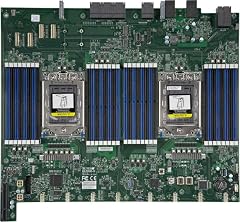
It is the only dual-socket AMD board here, with two SP3 sockets for EPYC 7002 and 7003 processors and DDR4 support. That makes it the capacity king of the list at the cost of a 2U or wider chassis.
Pros
- Two SP3 sockets for dual EPYC 7002 or 7003
- DDR4 RDIMM and LRDIMM support with up to 16 DIMM slots
- The only dual-socket AMD board in this selection
Cons
- Board width requires a 2U or wider server chassis
- Dual CPUs draw more power than any single-socket pick
- Older platform replaced by SP5
Good fit if
- Dense virtualization hosts
- Memory-heavy workloads like in-memory databases
Skip if
- You want a quiet tower build
- You plan to upgrade to EPYC 9000 later
Verdict: Choose the H12DGO-6 when core count and memory capacity matter more than platform age.
3 Best for Intel Xeon 6

This is the only board in the list that supports Intel Xeon 6 processors on the LGA4710 socket, with DDR5 memory and dual 10GbE networking. It is the forward-looking Intel pick here.
Pros
- Supports Intel Xeon 6 processors on LGA4710
- DDR5 memory support
- Dual socket for two Xeon 6 CPUs
- Dual 10GBase-T networking on board
Cons
- Xeon 6 processors are a new, premium platform
- DDR5 RDIMMs cost more than DDR4
- Requires a dual-socket server chassis
Good fit if
- New Intel server builds aiming for a long lifecycle
- Two-socket workloads with DDR5 capacity
Skip if
- You are reusing DDR4 memory
- You need a compact ATX or smaller board
Verdict: The X14DBI-T is the board to pick for an Intel Xeon 6 two-socket server.
4 Best for AMD EPYC on a budget

The H13SSL-NT is the only SP3 board in this list, supporting EPYC 7002 and 7003 processors with DDR4 memory. For anyone with DDR4 already on hand, it is the lower-cost path to a modern EPYC server.
Pros
- SP3 socket accepts AMD EPYC 7002 and 7003
- DDR4 memory support, often cheaper than DDR5
- ATX form factor for standard cases
Cons
- Platform is one generation behind SP5
- No stated number of DIMM slots
- 10GbE not stated by the seller
Good fit if
- Upgrading an existing DDR4 server
- Homelab builders with EPYC 7002 or 7003 CPUs
Skip if
- You want the newest AMD chips
- You need more than eight memory channels
Verdict: The H13SSL-NT is the sensible SP3 pick when DDR4 economics matter.
5 Best compact Intel with 10GbE

This ATX board brings dual 10GBase-T ports and the C621A chipset for LGA4189 Xeon Scalable processors into a smaller footprint than the E-ATX options. It is the most network-ready single-socket Intel board here.
Pros
- ATX form factor fits standard cases
- Dual 10GBase-T ports built in
- C621A chipset supports Xeon Scalable on LGA4189
- DDR4 memory, cheaper than DDR5
Cons
- LGA4189 platform is one generation old
- No stated number of PCIe slots
- No stated number of DIMM slots
Good fit if
- Storage servers that need 10GbE without an add-in card
- Single-socket Xeon Scalable builds in a tower
Skip if
- You need dual sockets
- You plan to move to DDR5
Verdict: The X12SPI-TF is the compact Intel pick when 10GbE is a requirement.
6 Best dual-socket Intel for DDR4

It pairs two LGA4189 sockets with DDR4 memory and the C621A chipset, giving a two-socket Xeon Scalable platform without forcing the move to DDR5. It is the flexible middle ground of the Intel dual-socket picks.
Pros
- Dual LGA4189 sockets for two Xeon Scalable CPUs
- DDR4 memory support
- C621A chipset with modern feature set
Cons
- Form factor not stated by the seller
- Dual sockets need a server-class chassis
- No stated number of DIMM slots
Good fit if
- Two-socket Intel builds reusing DDR4
- Virtualization or database servers with many cores
Skip if
- You want a single-socket board
- You prefer DDR5 memory
Verdict: The X12DDW-A6 is the balanced dual-socket Intel choice.
7 Best Intel Xeon DDR5 alternative

The X13DEI-O brings the LGA4677 socket and DDR5 support, which is the generation before the Xeon 6 platform. It is the more established DDR5 Intel option in this list.
Pros
- LGA4677 socket for Xeon Scalable processors
- DDR5 memory support
- Eight DIMM slots for capacity
Cons
- LGA4677 processors and DDR5 RDIMMs carry a premium
- Platform is older than the Xeon 6 LGA4710
- Form factor not stated by the seller
Good fit if
- Builds that want DDR5 without the very newest platform
- Single-socket Intel servers with high memory density
Skip if
- You are on a DDR4 budget
- You need dual sockets
Verdict: The X13DEI-O is the solid DDR5 Intel pick for single-socket servers.
8 Best LGA1700 mATX
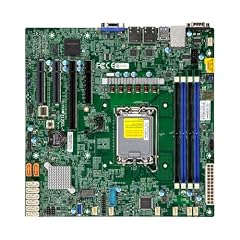
It is the only mATX board in the pool that supports the LGA1700 socket, which opens the door to both Xeon E-2300 and 12th or 13th gen Core processors. Its compact size suits small rack builds.
Pros
- mATX size fits small cases and 1U-plus racks
- LGA1700 socket with a wide CPU choice
- DDR5 support on the X13 generation
- ECC UDIMM support for error-correcting memory
Cons
- mATX limits the number of PCIe slots
- Fewer DIMM slots than ATX boards
- No stated number of DIMM slots
Good fit if
- Compact server or workstation builds
- Builds with Core i5 or i7 plus ECC memory
Skip if
- You need many PCIe cards
- You want a full ATX board
Verdict: The X13SCL-F-O is the compact LGA1700 pick for small servers.
9 Best Mini-ITX

Supermicro MBD-X13SCL-IF-O Intel LGA-1700 Single Socket Mini-ITX Server
- Socket
- LGA1700
- Form factor
- ITX
- Memory type
- DDR5
It is the only Mini-ITX board in the pool, with LGA1700 and DDR5 support. For edge nodes, network appliances, or a small home server, it fits where no other pick will.
Pros
- Mini-ITX size fits very small chassis
- LGA1700 socket with Xeon E-2300 or Core options
- DDR5 memory support
Cons
- Single PCIe slot limits expansion
- Small board means less room for many SATA or NVMe ports
- No stated number of DIMM slots (usually 2 on ITX)
Good fit if
- Edge computing and appliances
- Space-constrained home servers
Skip if
- You need more than one PCIe slot
- You prefer a larger board for airflow
Verdict: The X13SCL-IF-O is the only Mini-ITX choice here, and a good one.
10 Best LGA1200 workstation board
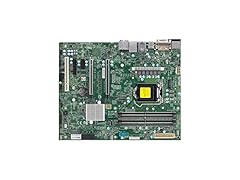
SUPERMICRO MBD-X12SAE-5-O ATX Server Motherboard LGA 1200 Intel W580
- Socket
- LGA1200
- Form factor
- ATX
It is the only board in the pool with the LGA1200 socket, using the Intel W580 chipset for Xeon W-1200 and compatible Core processors. It is the most approachable board for a workstation build.
Pros
- ATX form factor with a wide case choice
- W580 chipset supports Xeon W-1200 and Core
- DDR4 ECC UDIMM memory, cheaper than RDIMM
Cons
- LGA1200 is an older socket
- Single-socket design limits core counts
- No stated number of DIMM slots
Good fit if
- Budget workstation builds
- Users who already have LGA1200 CPUs or DDR4 UDIMMs
Skip if
- You need the latest Intel platform
- You want RDIMM support
Verdict: The X12SAE-5-O is the friendly workstation pick for LGA1200 owners.
11 Best dual-socket LGA2011

It offers two LGA2011 sockets with DDR4 support and a stated ATX form factor, which is rare for a dual-socket board. For labs that already run Xeon E5-2600 v3 or v4, it is the practical retrofit choice.
Pros
- Dual LGA2011 sockets for two Xeon E5-2600 v3 or v4
- ATX form factor, unusual for dual-socket boards
- DDR4 memory support
Cons
- LGA2011 is a legacy platform
- No stated number of DIMM slots
- Needs a CPU cooler and chassis that fit dual sockets
Good fit if
- Upgrading an older dual-socket server
- Homelab builds with spare E5-2600 CPUs
Skip if
- You want a new platform
- You need DDR5 memory
Verdict: The X10DRI-T4 is the dual-socket pick when you already own LGA2011 hardware.
12 Best budget dual-socket LGA2011

SUPERMICRO MBD-X10DRL-I ATX Server Motherboard Dual LGA 2011 R3 Intel
- Socket
- LGA2011
- Form factor
- ATX
It offers dual LGA2011 sockets with DDR4 support in an ATX form factor, making it a practical choice for a two-socket build with existing Xeon E5-2600 v3 or v4 CPUs. The board keeps the cost of entry low without sacrificing the dual-socket capability.
Pros
- Dual LGA2011 sockets for two Xeon E5-2600 v3 or v4
- ATX form factor
- DDR4 memory support
Cons
- Legacy socket with limited upgrade path
- Fewer features than newer dual-socket boards
- No stated number of DIMM slots
Good fit if
- Entry-level dual-socket homelabs
- Builds with a strict budget but a need for many cores
Skip if
- You need modern I/O like 10GbE
- You prefer a newer platform
Verdict: The X10DRL-I is the value play for two-socket LGA2011 builds.
13 Best quad-socket legacy board

This is the only four-socket motherboard in the pool, with four LGA2011 sockets for Xeon E5-2600 v2 processors. It exists for workloads that genuinely need more than two physical CPUs on one board.
Pros
- Four LGA2011 sockets for up to four Xeon E5-2600 v2
- The only quad-socket board in this selection
- DDR3 memory keeps module costs low
Cons
- Very old platform with limited driver support
- Requires four matching processors and a large chassis
- No stated RAM type in the listing (DDR3 expected)
Good fit if
- Legacy multi-CPU workloads
- Research or lab systems needing many cores in one unit
Skip if
- You want any modern platform
- You need fewer than four sockets
Verdict: The X9QRI-F+ is a niche pick for quad-socket needs only.
Specifications side by side
| # | Motherboard | Socket | Form factor | Memory type |
|---|---|---|---|---|
| 1 | Supermicro H14SSL-NT AMD EPYC Single Socket SP5 DDR5 ATX Motherboard | SP5 | ATX | DDR5 |
| 2 | Supermicro H12DGO-6 Server Motherboard | SP3 | ATX | DDR4 |
| 3 | Supermicro X14DBI-T Server Motherboard | LGA4710 | not stated | DDR5 |
| 4 | SP3 Supermicro MBD-H13SSL-NT-B | SP3 | not stated | not stated |
| 5 | Supermicro X12SPI-TF ATX Server Motherboard | LGA4189 | ATX | DDR4 |
| 6 | Supermicro X12DDW-A6 Server Motherboard | LGA4189 | not stated | DDR4 |
| 7 | Supermicro MBD-X13DEI-O Motherboard | LGA4677 | not stated | DDR5 |
| 8 | Supermicro MBD-X13SCL-F-O Motherboard | LGA1700 | mATX | not stated |
| 9 | Supermicro MBD-X13SCL-IF-O Intel LGA-1700 Single Socket Mini-ITX Server | LGA1700 | ITX | DDR5 |
| 10 | SUPERMICRO MBD-X12SAE-5-O ATX Server Motherboard LGA 1200 Intel W580 | LGA1200 | ATX | not stated |
| 11 | New Supermicro X10DRI-T4+ DP Motherboard | LGA2011 | not stated | DDR4 |
| 12 | SUPERMICRO MBD-X10DRL-I ATX Server Motherboard Dual LGA 2011 R3 Intel | LGA2011 | ATX | not stated |
| 13 | Supermicro X9QRI-F+ Motherboard | LGA2011 | not stated | not stated |
How the picks were chosen
We started from a pool of 45 Supermicro motherboards currently offered by the store listing that feeds this page, of which 24 had complete specification lines. We kept the 13 that cover the main server platforms available now: AMD SP3 and SP5, Intel LGA4710, LGA4677, LGA4189, and LGA1200. We excluded boards whose listings did not state a socket or memory type, because those two facts decide whether a board can take the processor and RAM you already own. Every specification in the picks comes from the seller's listing, which is shown with its snapshot time next to the price. We did not test any of these boards; the ranking reflects the published specifications only, and prices are live from the listing page.
Picking the right one for you
Match the socket to the processor you own or plan to buy
Every motherboard in this guide is built around one socket, and that socket fixes the CPU family. AMD boards use either SP3 (EPYC 7002 and 7003) or SP5 (EPYC 9004 and 9005). Intel boards use LGA4710 for Xeon 6, LGA4677 for Xeon Scalable, LGA4189 for older Xeon Scalable, LGA1200 for Xeon W-1200 and compatible Core chips, or LGA2011 for legacy Xeon E5-2600 parts.
If you already own processors or memory, buy a board that matches them. If you are buying everything new, the SP5 and LGA4710 platforms are the current generations, while LGA4189 and LGA4677 remain solid but older options. The Intel processor number page from Intel explains how suffix letters like E or U change what a chip is meant for.
Memory type decides the whole build cost
Server boards take one of three memory families: DDR5 RDIMM or LRDIMM, DDR4 RDIMM or LRDIMM, or ECC UDIMM. They do not take plain desktop UDIMMs. The memory type is listed with each pick, and it is the single biggest cost variable after the CPUs.
DDR5 boards like the H14SSL-NT and X14DBI-T pair with the newest EPYC and Xeon 6 chips, but DDR5 RDIMMs cost more per gigabyte. DDR4 boards such as the H12DGO-6 and X13SEI-F-B let you reuse cheaper DDR4 modules. A board that says ECC UDIMM, like the X13SCL-F-O, is the least expensive memory path if you do not need the capacity of RDIMMs.
Form factor: ATX, E-ATX, mATX, or Mini-ITX
The form factor decides which case can hold the board. ATX boards like the H14SSL-NT and X12SPI-TF fit most tower cases and many rack chassis. E-ATX boards such as the H12DGO-6 and X12SPA-TF are wider and need a server chassis or a large tower with E-ATX support.
mATX boards like the X13SCL-F-O fit smaller cases, and the Mini-ITX X13SCL-IF-O is the only one here that fits very compact enclosures. If you are building in a standard tower, check that the case lists E-ATX or ATX support before buying a dual-socket board, because several of the picks do not state a form factor and may need server hardware.
Networking: what is on the board matters
The newest boards in this list integrate 10GbE networking: the H14SSL-NT, X14DBI-T, and X12SPI-TF each have dual 10GBase-T ports. That saves a PCIe slot and the cost of a 10GbE add-in card. Older boards such as the X10DRL-I and X9QRI-F+ typically have 1GbE only, though the pool data does not list the port count for every board.
If your lab or office runs 10GbE switching, a board with built-in 10GbE is the cleaner choice. If you are on a 1GbE network, you can save money with a board that has 1GbE and add a higher-speed card later. Check the seller's listing for the exact number of ports because the pool does not state it for every pick.
Legacy boards are only for legacy workloads
Several picks use older sockets: LGA2011 (X10DRI-T4, X10DRL-I, X9QRI-F+) and LGA1200 (X12SAE-5-O). These boards are cheaper and can make sense when you already own the processors and memory. But they lack modern features: no DDR5, no PCIe Gen5, and in the LGA2011 case no support for current operating systems beyond what the seller lists.
If you are building new, prefer the SP5, LGA4710, or LGA4677 boards in this guide. Reserve the legacy boards for lab or test systems where the old hardware is already on a shelf. The Intel chipset page from Intel lists which chipsets pair with which processor families, which helps you tell a current platform from a retired one.
Questions
What is the difference between the SP3 and SP5 AMD sockets?
SP3 is the older AMD server socket, used by EPYC 7002 and 7003 processors. It uses DDR4 memory. SP5 is the newer socket for EPYC 9004 and 9005 processors, and it uses DDR5. The H14SSL-NT in this guide is the SP5 pick, while the H13SSL-NT is the SP3 pick. The two sockets are not physically compatible, so you must match the board to the CPU generation you own or plan to buy.
Do these boards work in a normal desktop case?
Some do. ATX boards like the H14SSL-NT and X12SPI-TF fit standard towers and most mid-tower cases with enough depth. E-ATX boards such as the H12DGO-6 and X12SPA-TF need a case that lists E-ATX support, and dual-socket boards generally need a server chassis with the right standoff pattern. Check the case specification for the motherboard size before you order.
What memory do Supermicro server boards take?
Server boards take server-class memory: RDIMM or LRDIMM modules, or in some cases ECC UDIMMs. They do not normally accept standard desktop UDIMMs without ECC. The memory type is listed in each pick: for example, the H14SSL-NT takes DDR5 RDIMM/LRDIMM, the H12DGO-6 takes DDR4 RDIMM/LRDIMM, and the X13SCL-F-O takes DDR5 ECC UDIMM. Check the seller's listing for the exact module list before buying RAM.
Can I run Windows 11 on a Supermicro board?
You can on the newer boards that support a compatible 64-bit processor and meet the Windows 11 minimum requirements: a 1 GHz or faster dual-core CPU, 4 GB of RAM, 64 GB of storage, UEFI with Secure Boot, TPM 2.0, and a DirectX 12 compatible GPU. The older LGA2011 and LGA1366 boards in this pool mostly lack TPM 2.0 support, so they are better suited to Linux or Windows Server. Microsoft's Windows 11 specification page lists the full requirements.
How many drives can I connect?
The seller listings for the boards in this guide do not all state the number of SATA or NVMe ports. In general, boards like the H14SSL-NT and X12SPI-TF support multiple SATA drives plus NVMe over their PCIe slots, but the exact count depends on the model. Check the board's product page on the Supermicro site for the storage specification before you plan the drive layout.
Revision notes
- : First published.