
Best Mini-ITX Motherboards 2026: 12 Picks Compared on Specs
For most small form factor builds, the ASUS ROG Strix X870-I Gaming WiFi is the Mini-ITX board to start with: it pairs the AM5 socket and DDR5 with two USB4 ports, two M.2 slots, WiFi 7 and 2.5Gbit LAN, the fullest stated connectivity in this list. Intel builders should look at the ASRock Z790I Lightning WiFi, and home server builders at the C612 and C246 NAS boards. Every pick comes from stated specifications and the makers' published information, not from testing, and prices on the page are live.
12 picks from 11 motherboards that match this guide with a price we can quote today. The prices below are current and each carries its read time.
Quick picks
The best fit for you
- For a small AM5 gaming PC: The ASUS ROG Strix X870-I Gaming WiFi is the only pick that states USB4, and it adds WiFi 7 and two M.2 slots on the AM5 socket. See pick 1
- For an Intel overclocking build: The ASRock Z790I Lightning WiFi is the only Z790 board here, with DDR5 support stated up to 8600+ MHz (OC) and up to 128GB. See pick 3
- For a compact NAS with many drives: The Staclik C612 board states 10 SATA ports, dual 10GbE and ECC memory support, the most SATA ports listed in this guide. See pick 8
- For reusing DDR4 on Intel: The ASRock B760M-ITX/D4 WiFi keeps DDR4 memory on the LGA1700 socket and still includes WiFi, which the two DDR4 ASUS and Romindly boards do not state. See pick 4
Our 12 picks
1 Best overall

ASUS ROG Strix X870-I Gaming WiFi AMD X870 AM5 DDR5 8400 HDMI 2xUSB4 2X
- Socket
- AM5
- Form factor
- ITX
- Memory type
- DDR5
$349.99 price as of 2026-10-07 05:30 UTC (Details)
The ROG Strix X870-I states the widest feature set among the 12 picks: two USB4 ports, two M.2 slots, WiFi 7 with Bluetooth, 2.5Gbit LAN and HDMI on the AM5 socket. Its DDR5 support is listed at 8400. For a small gaming or creator PC with a Ryzen processor, it covers more of the usual needs than the other AM5 pick.
Pros
- Two USB4 ports, the only pick that states USB4
- WiFi 7 plus Bluetooth, the newest WiFi standard stated in this list
- Two M.2 slots and 2.5Gbit LAN
- HDMI output for processors with integrated graphics
Cons
- SATA port count not stated by the seller
- AM5 only: no option for Intel processors
Good fit if
- Ryzen builders who want USB4 for fast external drives or docks
- Small form factor gamers who want WiFi 7 built in
Skip if
- You need many SATA drives for a NAS
- You are building on an Intel processor
Verdict: The most complete stated feature set for a Mini-ITX AM5 build.
2 Best AM5 board without USB4

ASRock B650I Lightning WiFi AMD AM5 Mini-ITX Motherboard
- Socket
- AM5
- Form factor
- ITX
- Memory type
- DDR5
$169.99 price as of 2026-10-07 05:29 UTC (Details)
The ASRock B650I Lightning WiFi also uses the AM5 socket with DDR5 and states support for Ryzen 9000, 8000 and 7000 series processors. Its listing names WiFi but not USB4, WiFi 7 or a second M.2 slot, so it suits builders who do not need the extra ports of the X870-I.
Pros
- States support for Ryzen 9000, 8000 and 7000 series processors
- DDR5 memory on the AM5 socket
- WiFi built in
Cons
- M.2 slot count not stated by the seller
- WiFi generation and LAN speed not stated by the seller
- No USB4 stated, unlike the X870-I
Good fit if
- Ryzen builders who want WiFi and DDR5 without USB4
- Small gaming PCs with one graphics card and one or two drives
Skip if
- You need USB4 or WiFi 7
- You plan to use a DDR4 kit you already own
Verdict: A simpler AM5 Mini-ITX option when USB4 is not on your list.
3 Best for Intel overclocking

ASRock Phantom Gaming Intel Z790I Lightning WiFi DDR5 DIMMs up to 8600+
- Socket
- LGA1700
- Form factor
- ITX
- Memory type
- DDR5
$442.99 price as of 2026-10-07 05:30 UTC (Details)
The Z790I Lightning WiFi is the only Z790 board in the pool, and Z-series is Intel's chipset line for processor overclocking on LGA1700. Its listing states DDR5 up to 8600+ MHz (OC) and up to 128GB, the highest memory speed stated among the picks.
Pros
- Z790 chipset, the only overclocking chipset among the six LGA1700 picks
- DDR5 up to 8600+ MHz (OC), the highest stated memory speed here
- Up to 128GB of memory stated
- WiFi and M.2 listed
Cons
- M.2 slot count and LAN speed not stated by the seller
- LGA1700 only: no path to newer Intel sockets
Good fit if
- Builders with an unlocked Intel 12th to 14th Gen processor
- Small PCs that need fast DDR5 and WiFi
Skip if
- You will not overclock and a B760 or H610 board covers your needs
- You want USB4, which this listing does not state
Verdict: The Intel Mini-ITX pick for tuning processor and memory speed.
4 Best Intel board for DDR4 with WiFi

ASRock B760M-ITX/D4 WiFi Supports 13th Gen & 12th Gen Intel® Core™
- Socket
- LGA1700
- Form factor
- ITX
- Memory type
- DDR4
$129.99 price as of 2026-10-07 05:29 UTC (Details)
The ASRock B760M-ITX/D4 WiFi runs 12th and 13th Gen Intel Core processors on LGA1700 with DDR4 memory. Of the three DDR4 LGA1700 picks, it is the only one whose listing states WiFi.
Pros
- DDR4 support lets you keep an existing memory kit
- WiFi built in, unlike the other DDR4 LGA1700 picks
- B760 chipset for 12th and 13th Gen Intel Core processors
Cons
- Listing names 12th and 13th Gen only; 14th Gen support not stated by the seller
- M.2 slot count and LAN speed not stated by the seller
Good fit if
- Intel upgraders reusing DDR4 memory
- Small home or office PCs that connect over WiFi
Skip if
- You want DDR5 for a new build
- You plan to overclock the processor (B760 is not a Z-series chipset)
Verdict: The practical DDR4 route to a wireless Intel Mini-ITX PC.
5 Best basic Intel DDR5 board

ASUS Prime H610I-PLUS-CSM Intel® H610
- Socket
- LGA1700
- Form factor
- ITX
- Memory type
- DDR5
$129.99 price as of 2026-10-07 05:30 UTC (Details)
The ASUS Prime H610I-PLUS-CSM is an entry chipset board for LGA1700 with DDR5 5600, PCIe 4.0, an M.2 slot and Intel 1Gb LAN. CSM marks ASUS's commercial line, which fits an office or family PC more than a gaming build.
Pros
- DDR5 5600 memory support stated
- PCIe 4.0 and an M.2 slot
- Intel 1Gb LAN for wired networking
Cons
- No WiFi stated
- One M.2 slot stated, fewer than the two on the X870-I
- H610 chipset: no processor overclocking
Good fit if
- Office or family PCs on a non-K Intel processor
- Wired desktops that need DDR5 and one NVMe drive
Skip if
- You need built-in WiFi
- You want more than one M.2 drive
Verdict: A plain, wired LGA1700 DDR5 board for everyday computers.
6 Best basic Intel DDR4 board

ASUS PRIME H610I-PLUS D4-CSM Intel H610
- Socket
- LGA1700
- Form factor
- ITX
- Memory type
- DDR4
$106.99 price as of 2026-10-07 05:30 UTC (Details)
This is the DDR4 version of the ASUS Prime H610I-PLUS in the commercial CSM line: LGA1700, PCIe 4.0, an M.2 slot and 1G LAN. It suits a simple wired build that reuses DDR4 memory.
Pros
- DDR4 support for reusing an existing kit
- PCIe 4.0 and an M.2 slot
- 1G LAN stated
Cons
- No WiFi stated, unlike the B760M-ITX/D4 WiFi
- H610 chipset: no processor overclocking
Good fit if
- Wired office PCs reusing DDR4 memory
- Simple home desktops on a 12th to 14th Gen Intel processor
Skip if
- You need WiFi on the board
- You are buying new memory anyway and prefer DDR5
Verdict: The simplest DDR4 Intel Mini-ITX board in this list.
7 Best LGA1700 server board

Supermicro MBD-X13SCL-IF-O Intel LGA-1700 Single Socket Mini-ITX Server
- Socket
- LGA1700
- Form factor
- ITX
- Memory type
- DDR5
The Supermicro MBD-X13SCL-IF-O is a single socket LGA1700 server motherboard with DDR5, the only board in the pool from a server maker. It suits a compact always-on server rather than a gaming PC.
Pros
- Server motherboard in the Mini-ITX size
- LGA1700 socket with DDR5 memory
- The only server-maker board among the 12 picks
Cons
- Chipset, M.2, SATA and LAN details not stated by the seller
- No WiFi stated
Good fit if
- Home lab or small office servers in a compact case
- Builders who want a server-class board for an LGA1700 processor
Skip if
- You are building a gaming PC
- You need WiFi or USB4
Verdict: A server-maker option for a small LGA1700 DDR5 server.
8 Best for NAS drive count

C612 Mini-ITX NAS Motherboard for E5 v3/v4
- Socket
- LGA2011-3
- Form factor
- ITX
- Memory type
- DDR4
$193.99 price as of 2026-10-07 05:38 UTC (Details)
This C612 board from Staclik targets NAS builds on LGA2011-3 with Xeon E5 v3 and v4 processors. It states 10 SATA ports, dual 10GbE, dual M.2 NVMe and ECC memory support, the most SATA ports listed in this guide.
Pros
- 10 SATA ports, the most stated among the picks
- Dual 10GbE networking
- Dual M.2 NVMe and ECC memory support
- Accepts Xeon E5 v3 and v4 processors
Cons
- Older LGA2011-3 platform with DDR4
- Listing notes one M.2 slot comes through an adapter
Good fit if
- NAS builders who want many drives in a small case
- Home labs with a 10GbE network
Skip if
- You want a current desktop platform for gaming
- You plan to run Windows 11 without checking processor support
Verdict: The most SATA ports for a Mini-ITX NAS in this list.
9 Best for SFF-8643 drive connections
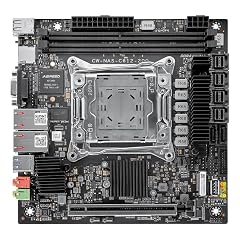
HKUXZR C612 NAS Motherboard LGA2011-3
- Socket
- LGA2011-3
- Form factor
- ITX
- Memory type
- DDR4
$179.99 price as of 2026-10-07 06:04 UTC (Details)
The HKUXZR C612 board is another LGA2011-3 NAS design, but it lists four SFF-8643 connectors alongside two SATA 6Gbps ports. It adds two 10GbE ports on an Intel X550-T2 controller, two M.2 NVMe slots and one PCIe x16 slot.
Pros
- Four SFF-8643 connectors, the only pick that lists them
- Two 10GbE ports on an Intel X550-T2 controller
- Two M.2 NVMe slots and one PCIe x16 slot
Cons
- Only two plain SATA 6Gbps ports stated
- Older LGA2011-3 platform with DDR4
Good fit if
- NAS builders using drive cages or backplanes with SFF-8643 cables
- Home labs that want 10GbE and an expansion card slot
Skip if
- Your drives connect only with plain SATA cables
- You want a modern desktop platform
Verdict: A C612 NAS board built around SFF-8643 cabling and 10GbE.
10 Best for multi-port 2.5G networking

N17 NAS Motherboard C246 LGA1151(Intel/C246/Mini ITX/DDR4 Support
- Socket
- LGA1151
- Form factor
- ITX
- Memory type
- DDR4
The N17 uses Intel's C246 chipset on LGA1151 with DDR4 ECC support. It lists four 2.5G LAN ports, eight SATA3 ports, two M.2 slots and a PCIe 3.0 x16 slot, a fit for a NAS that doubles as a router or firewall.
Pros
- Four 2.5G LAN ports, the most 2.5G ports stated here
- Eight SATA3 ports and two M.2 slots
- DDR4 ECC memory support on the C246 chipset
- PCIe 3.0 x16 slot for an expansion card
Cons
- Older LGA1151 platform
- No 10GbE, unlike the two C612 boards
Good fit if
- Home servers that route or firewall several networks
- NAS builds with up to eight SATA drives
Skip if
- You need 10GbE
- You want a platform with a current processor socket
Verdict: A C246 NAS board for builds that need four 2.5G ports.
11 Best industrial LGA1700 board

Romindly Industrial Mini-ITX Motherboard LGA1700 Supports 12/13/14 Gen
- Socket
- LGA1700
- Form factor
- ITX
- Memory type
- DDR4
The Romindly industrial board takes 12th, 13th and 14th Gen Intel Core processors up to 65W TDP on LGA1700 with DDR4. It states dual Intel LAN (one 2.5G, one 1G), useful for a compact firewall or edge box.
Pros
- Dual Intel LAN: one 2.5G port and one 1G port
- Supports 12th, 13th and 14th Gen Intel Core processors
- DDR4 memory on LGA1700
Cons
- Processors limited to 65W TDP
- M.2 and SATA counts not stated by the seller
- No WiFi stated
Good fit if
- Compact firewall, router or edge computing builds
- Low-power always-on systems on a 65W Intel processor
Skip if
- You want to run an Intel processor above 65W TDP
- You are building a gaming PC
Verdict: An industrial LGA1700 board for low-power networked systems.
12 Best for reviving an LGA1155 PC

The Wisoqu B75S uses the old LGA1155 socket with dual channel DDR3 memory. It makes sense only to repair or rebuild a system that already has an LGA1155 processor and DDR3 memory.
Pros
- Fits an existing LGA1155 processor
- Dual channel DDR3 lets you reuse old memory
- Mini-ITX size for a small replacement build
Cons
- Oldest socket and memory type among the picks
- M.2, SATA, LAN and WiFi details not stated by the seller
- Check Windows 11 processor support before relying on it
Good fit if
- Repairing an LGA1155 PC whose board failed
- Reusing an LGA1155 processor and DDR3 memory for a simple machine
Skip if
- You are building a new PC with a current processor
- You need NVMe storage or modern networking
Verdict: A repair part for LGA1155 systems, not a new-build board.
Specifications side by side
| # | Motherboard | Socket | Form factor | Memory type |
|---|---|---|---|---|
| 1 | ASUS ROG Strix X870-I Gaming WiFi AMD X870 AM5 DDR5 8400 HDMI 2xUSB4 2X | AM5 | ITX | DDR5 |
| 2 | ASRock B650I Lightning WiFi AMD AM5 Mini-ITX Motherboard | AM5 | ITX | DDR5 |
| 3 | ASRock Phantom Gaming Intel Z790I Lightning WiFi DDR5 DIMMs up to 8600+ | LGA1700 | ITX | DDR5 |
| 4 | ASRock B760M-ITX/D4 WiFi Supports 13th Gen & 12th Gen Intel® Core™ | LGA1700 | ITX | DDR4 |
| 5 | ASUS Prime H610I-PLUS-CSM Intel® H610 | LGA1700 | ITX | DDR5 |
| 6 | ASUS PRIME H610I-PLUS D4-CSM Intel H610 | LGA1700 | ITX | DDR4 |
| 7 | Supermicro MBD-X13SCL-IF-O Intel LGA-1700 Single Socket Mini-ITX Server | LGA1700 | ITX | DDR5 |
| 8 | C612 Mini-ITX NAS Motherboard for E5 v3/v4 | LGA2011-3 | ITX | DDR4 |
| 9 | HKUXZR C612 NAS Motherboard LGA2011-3 | LGA2011-3 | ITX | DDR4 |
| 10 | N17 NAS Motherboard C246 LGA1151(Intel/C246/Mini ITX/DDR4 Support | LGA1151 | ITX | DDR4 |
| 11 | Romindly Industrial Mini-ITX Motherboard LGA1700 Supports 12/13/14 Gen | LGA1700 | ITX | DDR4 |
| 12 | Wisoqu B75S Gaming Motherboard | LGA1155 | ITX | not stated |
How the picks were chosen
The catalogue lists 13 Mini-ITX motherboards. Twelve are compared here; the thirteenth is sold as a bundle with a processor and memory, so it is not a standalone board and is left out. Because the pool is small, the list covers very different jobs: AM5 and LGA1700 desktop boards, an LGA1700 server board, an industrial board, and NAS boards on LGA2011-3 and LGA1151. For each board we read the socket, memory type and the features stated in the listing name (M.2 count, USB4, WiFi, LAN speed, SATA and SFF-8643 ports), and we checked chipset and standard details against the official pages in the sources. Where the listing does not state a spec, we say so rather than guess. Nobody at this site has handled or tested these units. Prices are live and read from the store listing.
Picking the right one for you
Match the socket to your processor
The socket decides which processors fit. In this list, six picks use LGA1700 (Intel 12th to 14th Gen Core), two use AM5 (AMD Ryzen 7000 and newer), two use LGA2011-3 (Xeon E5 v3 and v4), one uses LGA1151 and one uses LGA1155.
For a new desktop build, AM5 and LGA1700 are the relevant choices here. The LGA2011-3 and LGA1151 boards are aimed at NAS and home server builds, and the LGA1155 board is a repair part.
Chipset: what it allows
On Intel boards the chipset sets what you can tune and connect. Intel's Z-series chipsets, such as the Z790 on the ASRock Z790I Lightning WiFi, support processor overclocking. B760 and H610 boards do not overclock the processor and cover everyday use.
Server chipsets such as C612 and C246 add ECC memory support, which the NAS boards in this list state. Intel's chipset pages list the feature set of each chipset.
Memory type: DDR5, DDR4 or DDR3
Five picks state DDR5, six state DDR4 and one uses DDR3. A board supports one memory type only, so a DDR4 kit will not fit a DDR5 board. DDR5 is defined by the JEDEC JESD79-5 standard and is the type to choose for a new build on AM5 or a DDR5 LGA1700 board.
Mini-ITX boards have little room for memory slots, so check the stated maximum capacity if you need a lot of memory. The Z790I Lightning WiFi states up to 128GB.
Storage: M.2, SATA and SFF-8643
Mini-ITX leaves little room for slots, so count the storage connectors you need before choosing. The X870-I, both C612 boards and the N17 state two M.2 slots; several other listings state one M.2 slot or do not give a count.
For a NAS, the SATA count matters most: the Staclik C612 states 10 SATA ports and the N17 states eight. The HKUXZR C612 uses four SFF-8643 connectors instead, which suit drive cages and backplanes wired for them.
Networking and USB: WiFi 7, 10GbE and USB4
Only the X870-I states WiFi 7, and only it states USB4, which carries fast external storage and displays over a USB-C cable. The Wi-Fi Alliance and USB-IF pages in the sources describe both standards.
For wired networking, the two C612 boards state dual 10GbE, the N17 states four 2.5G ports, and the Romindly board pairs a 2.5G port with a 1G port. Desktop boards in this list mostly state a single LAN port or do not give its speed.
Questions
Can a Mini-ITX motherboard run a full gaming PC?
Yes. A Mini-ITX board has room for a single graphics card, and boards such as the ASUS ROG Strix X870-I and ASRock Z790I Lightning WiFi pair it with DDR5, M.2 storage and WiFi. The limits are fewer memory slots, fewer M.2 slots and less room for extra cards, so plan storage and networking around what the board includes.
Why do some Mini-ITX boards use old server sockets like LGA2011-3?
The C612 boards in this list are built for NAS and home lab use. They take Xeon E5 v3 and v4 processors, support ECC memory and add dual 10GbE and many storage connectors, features rarely found on desktop Mini-ITX boards. The trade-off is an older platform with DDR4, so they suit storage servers rather than gaming or new desktop builds.
Do I need ECC memory for a home NAS?
ECC memory detects and corrects some memory errors, which matters for a system that stores data around the clock. It is not required, but if you want it, the board, chipset and processor must all support it. In this list, the Staclik C612 and N17 C246 boards state ECC support. Check the processor's own specifications as well before buying ECC memory.
Will these boards run Windows 11?
Windows 11 needs a compatible 64-bit processor and TPM 2.0, as listed on Microsoft's specifications page. Current platforms such as AM5 and LGA1700 are the safe choices. For the older LGA1155, LGA1151 and LGA2011-3 boards, check your exact processor against Microsoft's list of supported processors before planning a Windows 11 install; a Linux-based NAS system is another option.
Is DDR4 still worth choosing on a Mini-ITX board?
It can be, if you already own a DDR4 kit. The ASRock B760M-ITX/D4 WiFi and ASUS Prime H610I-PLUS D4-CSM let you reuse DDR4 on LGA1700. For a new build where you are buying memory anyway, a DDR5 board such as the ASUS Prime H610I-PLUS-CSM or one of the AM5 picks avoids a later memory change.
Revision notes
- : First published.